What Is SSD in a Laptop? Every Nigerian Buyer Needs to Read This Before Spending a Kobo
· June 6, 2026
Picture this. You’ve just bought a brand new laptop. You carry it home excited, plug it in, press the power button — and then you sit there waiting. And waiting. And waiting some more. The loading circle spins forever. Apps take ages to open. The whole thing feels like it’s moving through groundnut oil.
You didn’t buy a bad laptop. You bought a laptop with the wrong kind of storage.
This is one of the most common — and most avoidable — mistakes Nigerian laptop buyers make every single day. And it almost always comes down to one thing: not understanding what SSD means and why it changes everything about how a laptop feels in real use.
So let’s fix that today. No jargon. No unnecessary complexity. Just a straight explanation that will save you from a very expensive regret.
So What Exactly Is an SSD?
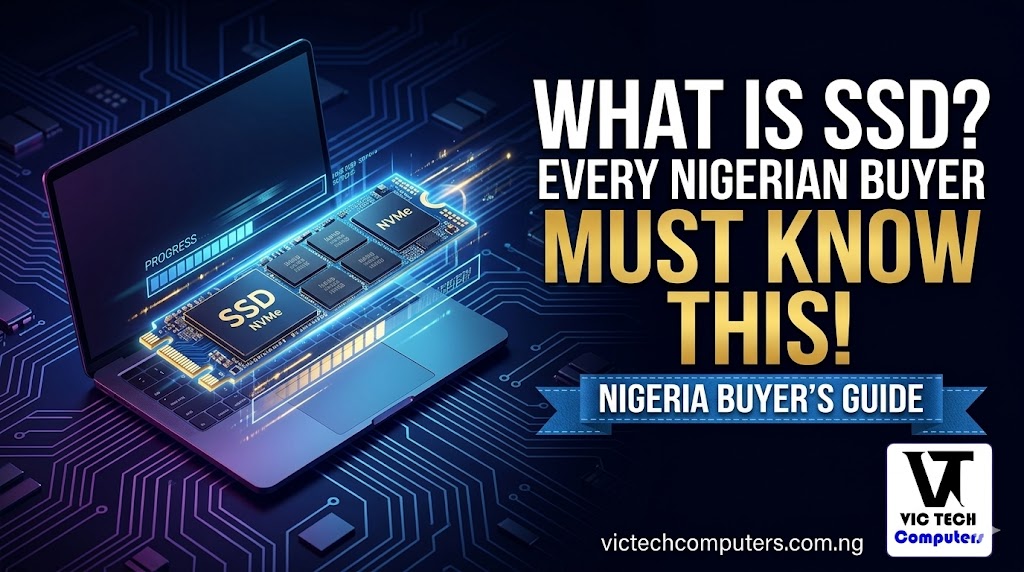
SSD stands for Solid State Drive. It’s the part of your laptop that stores everything permanently — your operating system, your apps, your documents, your photos, everything. Think of it as your laptop’s long-term memory.
An SSD is a storage device that uses flash memory to store data. Unlike traditional hard drives, which rely on rotating disks and mechanical arms to read and write information, SSDs operate without any moving parts.
That last part is the key. No moving parts. That might sound like a small technical detail but it changes everything about how fast your laptop works.
What Was There Before SSDs? The HDD Problem
Before SSDs became standard, laptops used HDDs — Hard Disk Drives. An HDD is basically a tiny record player inside your laptop. It has an actual spinning magnetic disk and a mechanical arm that physically moves across it to read and write data.
You can probably already guess the problem. Anything mechanical is slower, more fragile, and louder than something purely electronic. When your laptop needed to open a file, it had to wait for that disk to spin up and that arm to physically find the right spot. Every single time.
That’s why older laptops took 2 to 3 minutes to fully boot up. That’s why apps used to take forever to load. That’s why your laptop slowed down so badly when the storage got full. The mechanical parts were struggling to keep up.
An SSD has none of those problems. There’s nothing spinning. Nothing physically moving. Data is accessed almost instantly, electronically, like your phone reading a photo from its internal storage.
The Difference You’ll Actually Feel
Let me make this very practical for you.
On an HDD laptop, your laptop might take 2 to 3 minutes to fully boot up and be ready to use. On an SSD laptop with similar specs, that same boot takes 10 to 20 seconds. That’s not an exaggeration — a computer running an SSD typically boots in seconds, and application load times, file transfers, and general responsiveness all improve noticeably.
Opening Microsoft Word on an HDD? Wait 10–15 seconds. On an SSD? It’s open before you’ve finished reaching for your mouse.
Loading Chrome with several tabs? An HDD machine will struggle and stutter. An SSD handles it smoothly without breaking a sweat.
This is why two laptops with identical processors and identical RAM can feel completely different in daily use. The one with an SSD will feel fast, responsive, and modern. The one with an HDD will feel sluggish regardless of what the spec sheet says.
Why This Matters Specifically in Nigeria
Here’s something that doesn’t get said enough in laptop buying conversations in Nigeria.
We deal with heat. Our laptops get carried in hot cars, used in warm offices, and powered through long hours of work when electricity is unstable. Heat is the enemy of mechanical hard drives — SSDs are significantly more durable and energy-efficient, extending battery life while being resistant to the physical shocks and heat that affect traditional drives.
That means an SSD laptop also gives you slightly better battery life, runs cooler, and is more likely to survive the daily physical reality of being a Nigerian’s laptop — thrown in a bag, carried across town, used for hours on battery backup.
An HDD in those conditions? It’s fighting a losing battle from day one.
The Types of SSD You’ll Encounter
When shopping for laptops in Nigeria, you’ll see a few different storage descriptions. Here’s what they mean:
SATA SSD — The older, slower type of SSD. Still miles faster than an HDD, but not the quickest option available today. Common in budget laptops.
NVMe SSD (M.2 PCIe) — This is the fast one. PCIe Gen 4 drives reach around 7,000 MB/s read speeds — that’s genuinely mind-blowing compared to an HDD’s 100–150 MB/s. Most mid-range and premium laptops in 2026 come with NVMe SSDs as standard.
eMMC — Typically found in budget laptops and entry-level devices, eMMC storage delivers sufficient performance for everyday tasks but is not designed for high-speed read/write operations. If you see eMMC advertised on a very cheap laptop, know that it’s faster than an HDD but significantly slower than a proper SSD. Avoid it if you can.
The short version: always look for NVMe SSD if your budget allows. If not, a SATA SSD is still a solid choice. Avoid HDD and be cautious about eMMC.
How Much SSD Storage Do You Actually Need?
Now that you know what SSD is, the next question is how much of it you need. Here’s a practical guide for Nigerian buyers:
256GB — Tight but workable for very basic use. Fine if you mostly work on documents and don’t store many files locally. Not ideal for long-term comfort.
512GB — For simple document editing, web browsing, and school or work tasks, 512GB is sufficient and provides better long-term comfort. This is the sweet spot for most students and everyday users.
1TB — Ideal if you store a lot of photos, videos, or downloaded software. Recommended for anyone who works with media or runs multiple large applications.
2TB and above — For video editors, designers, and power users only.
For most Nigerians buying a laptop for school, remote work, or everyday productivity, 512GB NVMe SSD is the target to aim for. Don’t let a seller convince you that 256GB is enough for the next three years — it rarely is once Windows updates and app installations start eating into your space.
One More Thing — SSD Prices Are Rising
This is worth knowing right now as a buyer in 2026. Enterprise SSD shipments grew over 20% annually between 2022 and 2024, and significant price increases in consumer SSDs are expected throughout 2025 and 2026 due to supply pressures from AI infrastructure demand.
In plain terms: the components inside your laptop’s storage are becoming more expensive globally. This is already slowly pushing laptop prices up in Nigeria. If you’ve been sitting on the fence waiting for prices to drop before buying — that might not happen this year. Buy smart and buy soon.
The Bottom Line
SSD is not a luxury feature reserved for expensive laptops. In 2026, it is the single most important factor separating a laptop that feels fast and modern from one that makes you want to throw it out the window after two weeks.
Before you buy any laptop in Nigeria — anywhere, at any price — check whether it has an SSD. If the seller can’t tell you, ask to see the spec sheet. If it says HDD, walk away or negotiate hard for something better. Your patience and your money both deserve better than a spinning disk in 2026.
Browse our full laptop listings at VicTechComputers.com.ng to compare SSD specs, storage sizes, and prices across every laptop available in Nigeria right now — all in naira, no guesswork.