Windows 11 vs Windows 10: Which Is Better for Your Laptop in 2026?
· June 7, 2026
The Windows 11 vs Windows 10 debate has been going on for a few years now. But in 2026, the conversation has changed completely — because the choice is no longer just about preference. There’s now a real deadline, real security risks, and real performance differences that affect every laptop user in Nigeria whether they realise it or not.
If you’re still running Windows 10 and wondering whether to upgrade, or you just bought a new laptop and want to understand what Windows 11 actually means for you — this guide will answer that clearly and honestly. No technical jargon, no unnecessary complexity. Just what you actually need to know.
The Big News Everyone Needs to Know First
Let’s start with something that changes everything about the Windows 11 vs Windows 10 question.
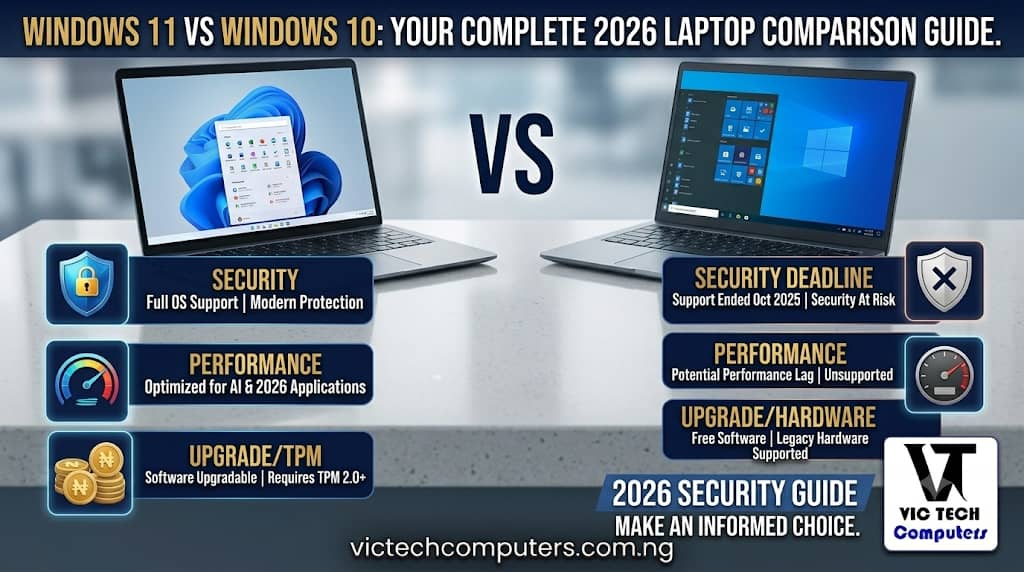
Windows 10 reached end of support in October 2025 — which means it is no longer receiving free security updates, feature updates, or standard technical support from Microsoft.
Read that again. Windows 10 is no longer getting security updates.
In practical terms, this means that every month that passes, Windows 10 becomes less secure. Hackers and malicious software specifically target operating systems that aren’t receiving patches anymore, because the security holes never get fixed. Anyone still running older versions of Windows won’t get new features and security updates to protect their device from cyberattacks — which makes upgrading to Windows 11 crucial right now.
If you’re still on Windows 10 in 2026, this alone should be enough reason to take the upgrade seriously.
Windows 11 vs Windows 10: Performance
One of the most common questions people ask when comparing Windows 11 vs Windows 10 is simply: which one runs faster?
The honest answer is — it depends on your laptop.
On newer hardware, Windows 11 can feel faster and smoother — especially for gaming and multitasking. On very old hardware, Windows 10 may actually run better because it is less demanding.
For anyone using a laptop bought in the last two to three years with a 12th Gen Intel or newer processor, Windows 11 is genuinely better. Windows 11’s Thread Director technology intelligently assigns tasks to performance or efficiency cores — and testing showed 15% better performance in multi-threaded workloads on compatible hardware. That means faster app loading, smoother multitasking, and a noticeably more responsive experience.
Windows 11 also boots 31% faster on average compared to Windows 10 on the same hardware — saving you meaningful time every single day.
But if your laptop is five or more years old and barely meets the minimum requirements, Windows 11 might actually feel heavier and slower than Windows 10 did on the same machine.
Windows 11 vs Windows 10: Battery Life
This matters a lot for Nigerian users. Every percentage of battery life counts when NEPA is unreliable.
Windows 11 extends battery life by an average of 11% through improved power management — with efficiency gains coming from better background task handling and more aggressive app suspension when apps are not actively in use.
That 11% might not sound huge, but on a laptop that used to give you 5 hours, that’s an extra 30 minutes of working time on battery. Over the course of a year, that adds up to a meaningful quality-of-life improvement for anyone working through regular power outages.
Windows 11 vs Windows 10: Security
Security is where Windows 11 wins without any real debate.
Windows 11 Pro starts from a more modern security footing than Windows 10. Microsoft made TPM 2.0 and Secure Boot part of the Windows 11 hardware requirements — which helps protect the system earlier in the startup process and gives newer PCs a stronger foundation before you even reach the desktop.
For Nigerian users who do online banking, remote work, or store sensitive business documents on their laptops, this is not a small thing. Cybercrime targeting individuals and small businesses in Nigeria has grown significantly, and running an unpatched operating system is handing attackers an open door.
Windows 11 is simply safer. That’s not marketing. That’s the technical reality.
Windows 11 vs Windows 10: New Features Worth Knowing
Beyond security and performance, Windows 11 brings a few features that are genuinely useful in daily work:
Snap Layouts — hover over the maximise button and you’ll see layout options for arranging windows side by side. Testing showed a 25% reduction in time spent arranging windows during typical workdays. For anyone working with multiple documents, browser tabs, and apps simultaneously — this is a real productivity upgrade.
Better Virtual Desktops — organise different workspaces for different projects. Keep your work apps on one desktop and your personal browsing on another. Simple but genuinely useful.
Improved Microsoft Teams Integration — with remote work growing across Nigeria, the built-in Teams integration in Windows 11 makes quick video calls more seamless than ever before.
Android App Support — Windows 11 allows you to run certain Android apps directly on your laptop — something Windows 10 could never do.
Can Your Laptop Even Run Windows 11?
This is where things get complicated for some users. Windows 11 has stricter hardware requirements than Windows 10, and not every laptop can make the jump.
To run Windows 11, your PC must meet requirements including TPM 2.0, Secure Boot, and a supported CPU generation. Most laptops bought in 2019 and later should be compatible, but older machines may not qualify.
Here’s the quickest way to check: search for “PC Health Check” in your Windows search bar and run the Microsoft tool. It will tell you in about 30 seconds whether your laptop supports Windows 11 or not. You can also check directly on Microsoft’s official website.
If your laptop doesn’t support Windows 11 — you have two options. One is to continue using Windows 10 carefully with extra antivirus protection, knowing that security updates have stopped. The other is to start planning for a laptop upgrade sooner rather than later.
So Which Should You Use in 2026?
Here’s the straightforward answer:
Use Windows 11 if:
- Your laptop was bought in 2019 or later
- You do online banking, remote work, or store sensitive files
- You want better battery life and faster performance
- You’re buying a new laptop — it comes with Windows 11 anyway
Stick with Windows 10 (carefully) if:
- Your laptop is too old to support Windows 11
- You’re using specialised software that hasn’t been confirmed compatible with Windows 11 yet
- You plan to replace your laptop soon anyway
The direction of travel is clear. Windows 10 vs Windows 11 in 2026 clearly shows that Windows 11 is the better choice for most users — especially those with modern PCs. Microsoft is putting all its resources into Windows 11, and Windows 10 will only fall further behind as time goes on.
If your laptop supports it, upgrade. If it doesn’t, start planning your next purchase.
For a full breakdown of the best Windows 11 laptops available in Nigeria right now — with prices in naira — browse VicTechComputers.com.ng. We compare specs and prices so you always know what you’re getting. You can also read more about Windows 11 requirements on TechRadar’s best Windows laptops guide.